Excel tax lodgement
Looking for a Fast, hassle-free solution to lodging your company, trust, partnership or superannuation tax return?
If you use Excel, effortlessly automate your business tax processes.
Connected data sources
Lodgeit makes lodging your company tax return simple with just 6 steps to get started:
- 01
STEP 01
Make sure that your accounts are in order and reconciled
- 02
STEP 02
Register for a MyGovId if you don’t have one
- 03
STEP 03
Sign up to use Lodgeit
- 04
STEP 04
Connect Lodgeit to the Australian Tax Office
- 05
STEP 05
Connect your accounting system to Lodgeit and import your accounts
- 06
STEP 06
Lodge your company tax return!
Learn how to lodge in this 5min 42sec video.

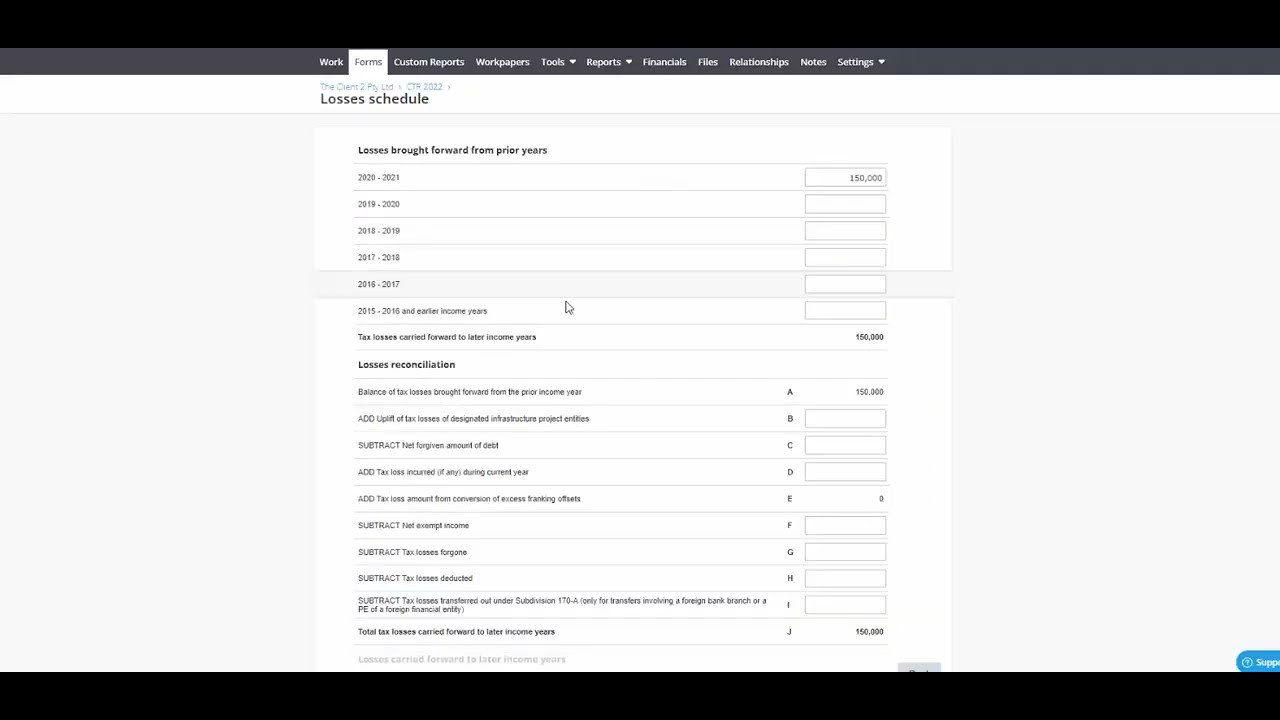
Fill Company Tax Return via Excel





Simpler than your current process?
That’s Lodgeit’s primary goal; make your life simpler and easier!
Rather than having an accountant lodge your return for you (they probably just run it through Lodgeit anyway), save yourself some time, money, and effort by signing up to Lodgeit below.
For a once-off fee from $60*, you can have your trust tax return lodged in 30 minutes.
*$60each if you buy 2 or more forms
And, if you don’t believe it’s that easy, you can sign up for free right now to give it a try, and only pay when you are ready to lodge.
We also offer a full 30 day money-back guarantee for your peace of mind – read our policy here.
Thousands of our users can vouch for the statement above.
“Really love the service as it made submitting my Trust tax return out of the country during the pandemic removing one of life’s stresses.”
 Lindari SolutionsCEO
“I found to begin with it was a little hard to work out but your staff were great. I am very impressed.”
“It has been fantastic, as someone that ants to lodge my own returns it has been a lifesaver. Keep up the good work.”
 Baker Management Co.CEO
15-point checklist
More about Lodging Your Own Trust Tax Return
When a business owner decides to lodge their own tax return, they should consider the following general points:
Determine the need to lodge
Ascertain whether the business is required to lodge a tax return for the relevant income year. This is obligatory for most businesses that operate within Australia, regardless of whether they have made a profit or incurred a loss.
Choose the method of lodgement
Business owners can lodge their tax returns through various methods, including using myTax for sole traders, SBR-enabled software for companies, trusts, or partnerships, or by paper.
Gather all relevant information
Before lodging the tax return, ensure that all necessary financial records, including income, deductions, and tax credits, are accurate and complete.
Report accurately
Make sure to report all assessable income while understanding what income to include and exclude. Claim legitimate business deductions and ensure that you have apportioned expenses correctly where they have both a business and private use component.
Keep good records
Maintaining proper and complete records is essential, as it helps to substantiate claims made in the tax return. Records must be kept for at least five years.
Calculate the correct amounts
Ensure accurate calculation of income, deductions and the tax owing or refund due. Utilise the correct rates and thresholds where applicable.
Review the return
Double-check the tax return for accuracy before lodging. Even if using a tax agent, the business owner is ultimately responsible for the correctness of the information in the return.
Lodge on time
Ensure that the tax return is lodged prior to the due date to avoid any late lodgement penalties.
Understand obligations
Acknowledge the business owner’s responsibility for what’s reported in the tax return, even if assistance is used to prepare it.
Plan for liabilities
If a tax bill is expected, plan beforehand to meet the payment deadline and avoid incurring interest charges and penalties.
Know your entitlements
Understand the various concessions, offsets, and reliefs available to businesses to optimise the tax position.
Seek help if needed
If in doubt, contact the ATO or consult a tax professional. Eligible business owners may also consider the ATO’s Tax Help program for free assistance.
Consider changes in law
Keep abreast of any tax law changes that may affect the business tax return for that income year.
Use available resources
Utilise the tools and calculators provided by the ATO, such as the ‘Fuel tax credit calculator’, to simplify the calculation of complex items like fuel tax credits.
Your Peace of Mind
A combination of technologists, tax specialists & accountants with years of experience have worked hard to build & maintain the rich features & fast forms that you’ll find on Lodgeit. All Lodgeit data is stored securely on the Australian Amazon Cloud and our security capabilities have been tested by Synopsys in order for us to be listed in the Intuit Apps Store.